


Ostrich VPN - Proxy Unlimited
4.64.32K Reviews
App Specs
- Version
- 3.5.1(411)
- Updated On
- License
- Free
- Downloads
- 5,000,000+
- Developer
- Geware VPN Pro
- Categories
- Productivity
- Platform
- Android
Screenshots
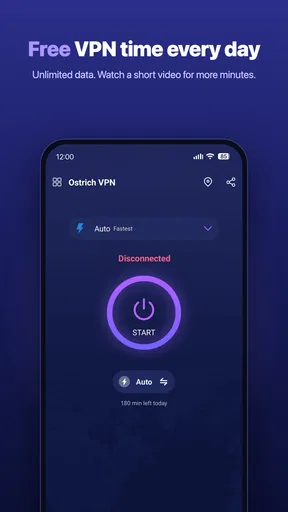
 Analysis by AppCompare
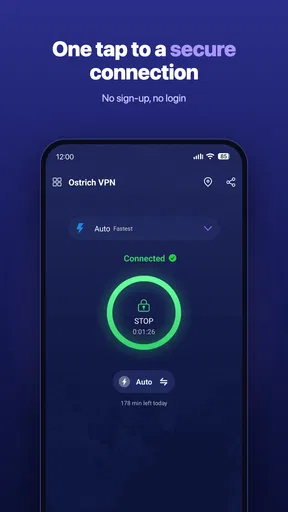
I often think of a VPN as a tool for a particular moment, not something I need to fuss over all day: joining a public network, checking a service while travelling, or wanting a proxy connection without configuring one manually. Ostrich VPN - Proxy Unlimited is aimed at that kind of quick access. It sits in the productivity category, is free to install, and is developed by Geware VPN Pro. Its focus on V2ray, VMess, and WebSocket makes it more specific than a basic one-tap VPN, even though the app is designed to be approachable.
What its current version tells me
The app is currently at version 3.5.1(411), following its release on March 15, 2023. That gives existing users a concrete point of reference when checking compatibility or deciding whether to update. It supports Android 6.0 and later, so it can suit older Android devices as well as newer ones. The age rating is Everyone, and the app has a 4.6 average from around 45,000 ratings, with more than five million installs.
Those figures suggest that Ostrich VPN has found a sizable audience, but popularity alone is not a privacy audit or a guarantee that it will work equally well on every network. I’d treat its current release as a reason to check that the installed version is current, not as proof that its performance, server availability, or privacy practices have changed in a particular way. The useful test is still whether it connects reliably where you actually need it.
Where the V2ray focus matters
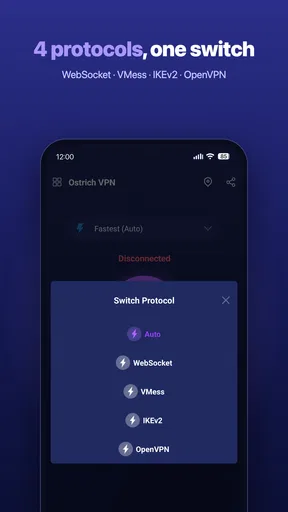
The V2ray, VMess, and WebSocket focus is the detail that most clearly separates this app from the simplest VPN utilities. If those terms mean nothing to you, that is not necessarily a problem: you can approach the app as a connection tool rather than learning protocol theory. But people who already work with proxy configurations may care more about how those options fit into their setup than someone who only wants a quick encrypted tunnel.
That distinction affects who I’d recommend it to. For a casual user, a straightforward connection flow is more important than a long list of technical labels. For a more experienced user, protocol support can be a useful starting point, but it does not by itself establish how a particular connection is routed or what level of privacy it provides. I would avoid assuming that a VPN makes every activity anonymous; it changes the path your traffic takes, and trust in the provider still matters.
How I’d judge a day-to-day connection
Picture arriving at a café, opening a laptop or phone, and needing to check a work document before a meeting. I’d connect before signing in to accounts or sending anything sensitive, then confirm that the pages and apps I need still work. If a site becomes unusually slow or refuses the connection, I’d switch networks or disconnect rather than repeatedly retrying with important work waiting. A VPN is useful in that moment, but it can add another point of failure to an otherwise simple task.
For travel, I’d also test the app at home before relying on it abroad. That gives me a chance to learn its controls while I have another connection available, and to see whether the services I use behave normally with a VPN enabled. If location access is the goal, I’d check the relevant service’s own terms and expectations instead of assuming a proxy will always make content available. Access rules and network blocks can vary, so a connection that works on one day or network may not work on another.
Worth Reading Before You Choose

EA SPORTS FC Mobile 26 Is a Bigger Football Game, but It Takes Time

Flipboard Shows What News Apps Must Do Beyond the Feed

Switching to Android Auto Means Rethinking Your Driving Routine

Google Calendar Makes a Crowded Week Easier to Manage

Ludo King Makes the Most of the Minutes Between Plans

Baby Panda World Brings Quick Play to Modern Phones, but Its Game Library Feels Busy
What I’d check before trusting it
My first practical check would be consistency: connect, open a few ordinary sites, disconnect, and compare how the phone behaves on the direct network. I’d repeat that on the networks I use most, because a VPN’s usefulness depends less on a single successful connection than on whether it works in the places that matter to me. If the app asks me to make a choice I don’t understand, I’d pause and read the explanation rather than tapping through just to get online.
I would also separate connection security from privacy promises. A VPN can help protect traffic on an untrusted network, but it does not make phishing links safe, replace strong account passwords, or protect information entered into a suspicious site. Nor would I treat an app’s protocol names as proof of independent security testing. For sensitive work, I’d follow my employer’s approved access method; for banking, I’d use the bank’s official app and keep its own security features enabled.
Setting Up and Getting Started
First things first, downloading Ostrich VPN - Proxy Unlimited is a breeze. Available for both Android and iOS, it takes just a couple of taps to get it on your device. Once you’ve installed it, you’re greeted with a user-friendly interface that doesn’t require a PhD to navigate. Seriously, even if you’re as tech-savvy as a potato, you’ll figure it out in no time.
The setup process is super straightforward. You’ll need to create an account, but it’s as simple as popping in your email and setting a password. No long forms or tedious verification steps, which is a huge relief. After that, you’re good to go.
Features You’ll Love
Now, onto the juicy bits. What makes Ostrich VPN - Proxy Unlimited stand out from the crowd? For starters, the app offers unlimited bandwidth. Yep, you read that right. None of that annoying "you’ve hit your limit" notification that pops up at the worst times. You can stream, browse, and download to your heart’s content.
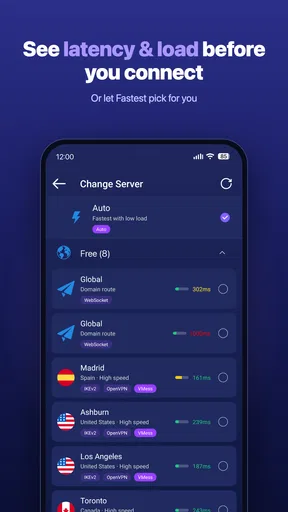
Another feature that I found particularly handy is the choice of servers. The app boasts a solid list of servers spread across various countries. Whether you need to access a site only available in the UK or want to watch a show exclusive to the US, you’re sorted. Just tap on the country you want, and you’re connected in seconds.
Performance and Reliability
No one likes a laggy connection, right? Thankfully, Ostrich VPN - Proxy Unlimited delivers on speed. During my testing, I didn’t notice any significant slowdown while streaming HD videos or browsing. It’s like the VPN isn’t even there, which is exactly what you want.
In terms of reliability, I didn’t experience any random drops or issues connecting to servers. The app seems pretty stable, which is a big plus if you’re using it for work or other important tasks.
Security and Privacy
Let’s talk security because, ultimately, that’s why you’re using a VPN in the first place. Ostrich VPN - Proxy Unlimited uses industry-standard encryption to keep your data safe from prying eyes. Whether you’re banking online or just browsing, you can rest easy knowing your information is secure.
The app also doesn’t log your activity, which is a crucial consideration. In a world where your data is often the product, it’s refreshing to find a service that respects your privacy. I did a bit of digging, and everything checks out—no dodgy privacy policies here.
Choosing it over a simpler VPN
Compared with the usual basic VPN app, Ostrich VPN’s named support for V2ray, VMess, and WebSocket gives it a more technical angle. That may appeal if you are already choosing among proxy protocols or want to investigate those options. If you only need a familiar connect button and have no interest in protocol details, a simpler VPN with clearly explained controls may be easier to evaluate. I would choose on clarity and trust, not on how many technical terms an app displays.
There is also a trade-off between convenience and control. A quick connection is handy when you are moving between networks, while protocol-focused options can matter to people who know why they want them. Before depending on any VPN for a routine, I’d make a short checklist: does it connect on my home and mobile networks, do my essential apps still work, and can I tell when the VPN is active? Those checks are more useful than assuming that “unlimited” means every connection will be fast or uninterrupted.
Who should use it—and who should pass
I can see this being a fit for someone who wants a free proxy-style VPN and is curious about V2ray-related support, especially if they are comfortable testing a connection rather than expecting it to solve every network problem automatically. It may also be useful as an occasional tool for browsing on public Wi-Fi, provided you keep normal security habits in place. The app’s broad adoption and strong average rating make it easy to see why people try it, but neither should replace your own checks.
I’d steer away if you need a VPN for a regulated workplace, a highly sensitive research task, or a setup that must meet a specific compliance requirement. In those cases, use a service your organization has vetted or a provider whose policies and technical claims you can assess in detail. I’d also suggest another option if you want extensive, plain-language explanations of privacy safeguards before connecting. With any VPN, the provider becomes part of the trust equation.
Small habits that make it more useful
One practical habit is to connect before opening the apps you want to use, rather than starting a sensitive session and enabling the VPN halfway through. If a connection stalls, avoid repeatedly switching settings while entering passwords or sending files; pause, disconnect cleanly, and retry when you have time to confirm the route is working. This keeps troubleshooting separate from the task you are trying to finish.
It is also worth noting which services behave differently with the VPN on. Some may ask for extra verification, show a different region, or refuse a connection. That does not automatically mean the VPN is broken, and it does not mean you should keep changing locations until a restriction disappears. For a work call or an important upload, reliability may matter more than using a VPN at that moment; choose the connection that best fits the task and any rules you need to follow.
Questions I’d answer before making it a habit
Would I use it for every connection? Not automatically. I’d use it when I have a reason, such as an untrusted network or a proxy-specific need, and leave it off when it creates friction with a service I rely on. Would I expect it to unblock every streaming library? No; region checks and VPN detection can change, so I’d avoid planning a trip or subscription around that assumption.
Would I recommend it to a complete beginner? Possibly, if the person is comfortable with a simple setup and understands that a VPN is only one part of online safety. If they want a service with extensive explanations and easily assessed privacy commitments, I’d compare alternatives first. And if they ask whether the current version will work on their particular network, my honest answer is to test it there before relying on it for anything time-critical.
Final Thoughts
So, is Ostrich VPN - Proxy Unlimited worth your time? In my opinion, absolutely. It’s user-friendly, reliable, and offers solid security without any hidden catches. Whether you’re a VPN newbie or a seasoned pro, you’ll find this app ticks all the right boxes.
If you’re looking for a VPN that’s as straightforward as it is effective, give Ostrich VPN - Proxy Unlimited a try. You might just find it becomes your new favorite app for staying safe online. And hey, if nothing else, it’s always nice to have a virtual escape plan up your sleeve!
Pros
- Unlimited bandwidth with high-speed servers.
- User-friendly interface for easy navigation.
- Strong encryption ensures data privacy.
- No registration required for quick access.
- Wide range of global server locations.
Cons
- Ads can be intrusive and frequent.
- Limited features in the free version.
- Occasional connection drops reported.
- No dedicated support for streaming services.
- Lacks advanced security features.
FAQs for Ostrich VPN - Proxy Unlimited
What platforms is Ostrich VPN - Proxy Unlimited available on?
Ostrich VPN - Proxy Unlimited is available for both Android and iOS devices. Users can easily download it from the Google Play Store or the Apple App Store. This ensures a wide range of compatibility, allowing users on different devices to benefit from its features and maintain privacy and security.
Is Ostrich VPN - Proxy Unlimited free to use?
Ostrich VPN - Proxy Unlimited offers a free version with basic features. However, there may be premium subscription options that provide enhanced features, such as faster connection speeds, a broader selection of server locations, and an ad-free experience. It's advisable to check the app's description for detailed pricing and feature options.
How secure is Ostrich VPN - Proxy Unlimited?
Ostrich VPN - Proxy Unlimited is designed to provide a secure browsing experience by encrypting your internet connection. It uses standard encryption protocols to protect your data from prying eyes and potential threats. However, it's important to review the app's privacy policy to understand how your data is handled and stored.
Can Ostrich VPN - Proxy Unlimited bypass geo-restrictions?
Yes, Ostrich VPN - Proxy Unlimited is equipped to bypass geo-restrictions, allowing you to access content that may be unavailable in your region. This feature is particularly useful for streaming services and websites that have regional limitations. Always ensure you comply with the terms of use of any services you access.
Does Ostrich VPN - Proxy Unlimited affect internet speed?
Using a VPN can sometimes affect your internet speed due to the encryption process and distance to the VPN server. Ostrich VPN - Proxy Unlimited aims to offer minimal speed reduction by providing numerous server options. Users can switch between servers to find the fastest one, enhancing their browsing experience.


